
Table of Contents

You increased your Google Ads budget. Nothing changed. Your spend may have gone up slightly, but leads, calls, and conversions stayed flat — or got worse. Before you assume you just need even more budget, stop. The problem is almost certainly not the money.
Google Ads does not work like a vending machine. Money in does not always equal better results. When you have already increased budgets but are seeing little uptick in extra spend and results, the problems are almost always somewhere else — your bids, your audience size, your ad quality, or something in the account structure that is quietly blocking spend. As Search Engine Land has noted, budget efficiency in the AI era must be evaluated against the share of available auctions, not just raw spend. The question is not whether you are spending enough. It is whether your account can win the auctions it is eligible for.
This article gives you a 5-cause diagnostic framework and a first test you can run in your Google Ads account in under two minutes. If your result from the first test tells you that budget IS the constraint, you can skip straight to the safe increase steps. If it tells you the budget is not the constraint — keep reading..
Table of Contents
ToggleThe First Test: Is Your Google Ads Account Actually 'Limited by Budget'?
Search Lost IS (Budget) vs Search Lost IS (Rank): The Two-Minute Diagnosis
Before touching your daily budget, run this quick diagnostic check:
- The Metric to Add: Search Lost IS (Budget)
- How to find it: In Google Ads, go to Campaigns → Columns → Modify Columns → Competitive Metrics, and check the box.
- Why it matters: This percentage represents the exact share of eligible ad impressions you completely missed because your daily budget ran out. If this number is close to 0%, a budget increase won’t help you; if it is high, budget is your definitive bottleneck.
How to interpret your Search Lost IS (Budget) score:
- If it’s HIGH (above 20%):
- The Verdict: Budget is a genuine bottleneck.
- The Action: Increasing it will immediately capture more traffic. Head straight to our 5-Step Safe Budget Increase Sequence below.
- If it’s LOW (near 0%):
- The Verdict: Budget is not your problem. Your ads aren’t running out of money; they are simply losing bids or relevance in the auction.
- The Action: Stop! Do not spend another dollar yet. Read the rest of this guide to diagnose your bidding and targeting first.
What the 'Limited by Budget' Status Label Actually Tells You
Google applies a ‘Limited by budget‘ status label to campaigns where your daily budget is genuinely capping your reach. If this label does not appear on your campaign, increasing your budget will not improve your results. The Google Ads Help Centre documents this label as a direct signal that spend capacity — not auction performance — is the limiting factor. Absent this label, the diagnostic moves to the five causes below.
Not sure how to find your Search Lost IS score? We can pull it in 2 minutes — book a free audit.
5 Real Reasons Your Budget for Ads Is Not Working (And How to Fix Each One)
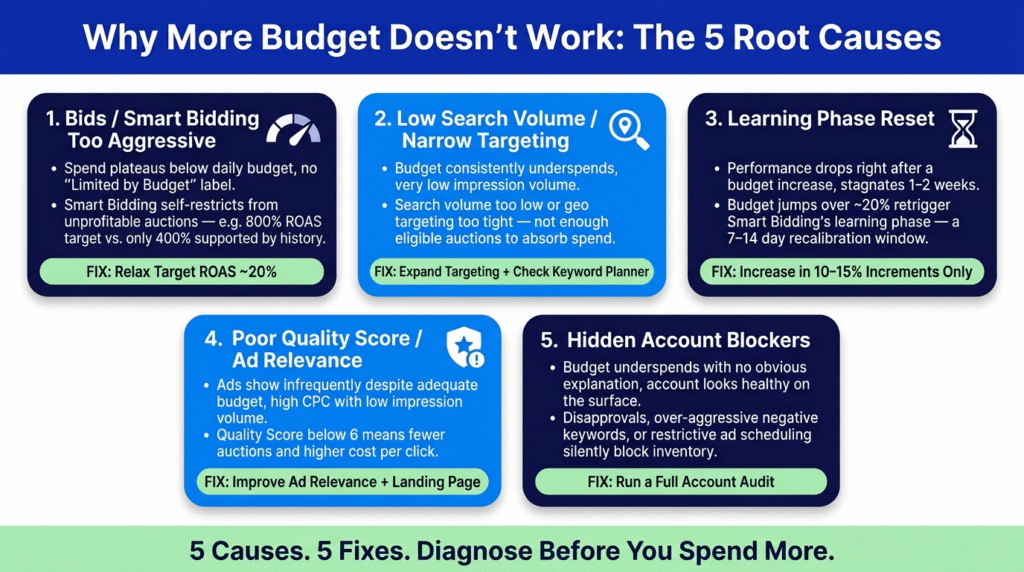
If your Search Lost IS (Budget) is low, one of these five causes is limiting your account. Each has a different fix. Treating them all as a budget problem is what keeps most accounts stuck.
CAUSE 1
Your Bids or Smart Bidding Targets Are Too Aggressive
SYMPTOM Budget not spending, or spending plateauing well below daily budget despite “Limited by Budget” label being absent.
ROOT CAUSE Google’s Smart Bidding algorithm self-restricts from auctions it cannot win profitably. If your Target ROAS is set at 800% but your account history only supports 400%, the algorithm will enter very few auctions — regardless of how much budget you have available.
FIX Relax your bidding target by 20% before touching spend.
Reduce Target ROAS by roughly 20%, or raise your Target CPA to give the algorithm more room to operate. As BigFlare notes, bids too low or smart bidding targets too aggressive is the single most common cause of Google Ads underspend — and the one most frequently misdiagnosed as a budget problem.
CAUSE 2
Low Keyword Search Volume or Narrow Google Ads Targeting
SYMPTOM: Budget consistently underspends regardless of bid level. The account shows very low impression volume.
ROOT CAUSE If keyword search volume in your target category is genuinely low, or your geo targeting is too tight, there are simply not enough eligible auctions to absorb more budget. No budget increase can create demand that does not exist.
FIX Check search volume before expanding the budget. Fix targeting first.
Use Google Keyword Planner to verify monthly search volume for your core terms, filtered to your target location. If volume is low, the fix is to expand match types, add related keyword variants, or broaden your Google Ads geo targeting. As McCordWeb identifies, narrow geographic targeting combined with limited keyword sets creates a hard ceiling on available auctions that a budget increase cannot overcome.
CAUSE 3
The Learning Phase — Why a Big Budget Jump Can Break Your Account Temporarily
SYMPTOM Performance drops immediately after a budget increase, then stagnates for 1 to 2 weeks.
ROOT CAUSE Budget changes above approximately 20% can trigger Smart Bidding campaigns to re-enter the learning phase — a 7 to 14 day window where the algorithm recalibrates its signals and performance temporarily stagnates.
FIX: Increase in 10 to 15% increments only. Wait for stability before judging.
The Google Ads Help Centre documents this threshold. Making a large budget change and then reverting it because performance dropped resets the learning phase again — extending the stagnation period. Small, incremental increases are not conservative. They are structurally correct.
CAUSE 4
Poor Quality Score and Low Ad Relevance
SYMPTOM Ads show infrequently despite adequate budget and competitive bids. High CPC with low impression volume.
ROOT CAUSE Google prioritises user experience across its ad inventory. A Quality Score below 6 means your ads enter fewer auctions and pay more per click regardless of your budget or bid level.
FIX: Improve ad-to-keyword relevance and landing page experience.
Review expected CTR, ad relevance, and landing page experience — the three components of Quality Score. BigFlare’s analysis identifies a Quality Score below 6 as the threshold at which auction frequency drops significantly. Fix the ad relevance and landing page first. Budget and bids become more effective once Quality Score improves.
CAUSE 5
Hidden Account Blockers — Disapprovals, Conflicting Negative Keywords, and restrictive Ad Scheduling
SYMPTOM Budget underspends with no obvious explanation. Account looks healthy on the surface.
ROOT CAUSE Disapproved ads or assets, over-aggressive negative keywords, restrictive ad scheduling windows, or paused ad groups can silently remove large portions of eligible inventory without triggering obvious warning labels.
FIX: Run a full account audit before increasing budget.
Check asset and ad approval status. Review negative keyword lists for broad exclusions that may be blocking relevant queries. Check ad scheduling settings — if ads are restricted to a narrow time window, available auctions are capped. McCordWeb’s 2025 diagnostic guide identifies over-aggressive negative keywords and narrow scheduling as two of the most common hidden blockers in SME accounts.
| Phase | Description |
|---|---|
Situation |
An e-commerce client increased their daily budget from $80 to $200. Conversions did not move. Spend went up slightly, then plateaued. They had already tried adjusting ad copy. Nothing changed. |
Approach |
Our audit found their Target ROAS was set at 800% — far too aggressive given the account’s conversion history. Google’s algorithm was self-restricting from most auctions because it could not win them profitably at that target. The budget was never the constraint. |
Outcome |
We relaxed the Target ROAS to 400%. Within 10 days, the algorithm was spending the full budget. ROAS stabilised at 520%. The account had not needed more money. It needed a more realistic target. With healthy margins, a lower ROAS achievement will often unlock more sales, revenue and profits. |
Which of these 5 causes sounds most like your account? Book a free diagnostic call with Adbiliti.
How to Find Keyword Search Volume Before You Budget for Ads
Using Google Keyword Planner to Diagnose Volume Constraints
Before setting or increasing an ad budget, the most useful question to answer is: how many eligible auctions exist in your target category? Google Keyword Planner gives you this number directly. Open the tool, enter your core category terms, and filter by your target location. The monthly search volume figure tells you the maximum available impression pool for that term.
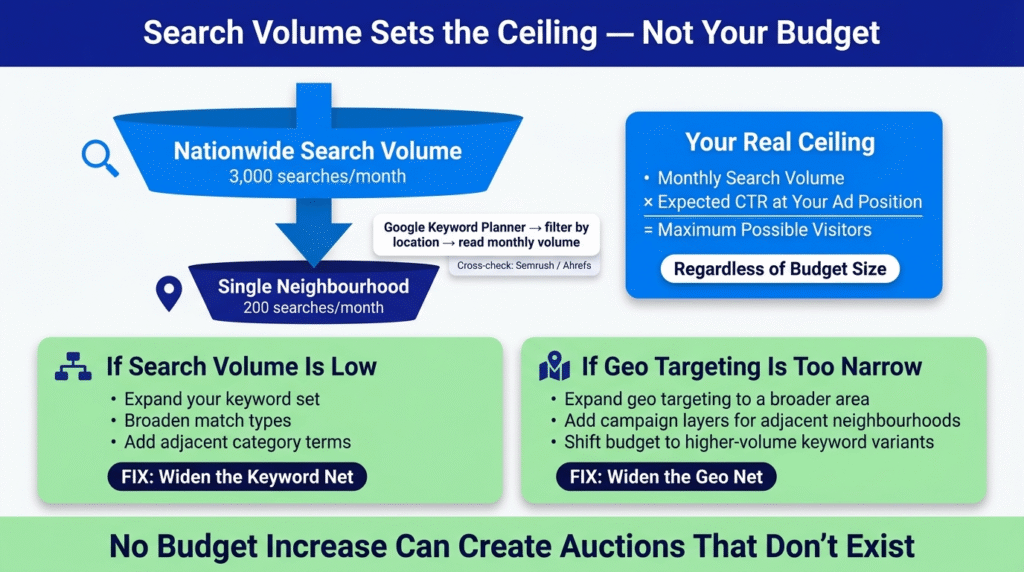
Multiply that monthly search volume by your expected click-through rate at your likely ad position. The result is your maximum possible monthly visitor volume from that keyword — regardless of how large your budget is. If that ceiling is low, a budget increase will not lift your results. The fix is to expand your keyword set, broaden match types, or enter adjacent category terms with higher volume.
For cross-validation or health-related verticals where keyword data is not available on the Keyword Planner, Semrush or Ahrefs can provide search volume estimates that complement the Keyword Planner data. The goal is not to find the exact number — it is to know whether the volume ceiling is the constraint before you commit more spend.
Google Ads Geo Targeting and Search Volume: Why Location Multiplies (or Destroys) Your Budget Efficiency
Google Ads geo targeting interacts directly with your available auction volume. A category with 3,000 monthly searches across the country may have only 200 monthly searches in a local neighbourhood. If your campaigns are targeted only to that neighbourhood, your maximum available impressions are capped at that local volume — and no budget increase can create auctions that do not exist.
This is one of the most common hidden ceilings in SME accounts. The advertiser sees underspend, assumes the budget is too low, increases it, and nothing changes — because the auction pool is already exhausted. The correct diagnostic step is to check Keyword Planner volume filtered to your specific geo target before attributing the underspend to budget.
If local neighbourhood volume is the constraint, the options are: expand geo targeting to a broader area, add campaign layers for adjacent neighbourhoods, or shift budget toward higher-volume keyword variants that capture the same intent across a wider area. See our Search Impression Share article for how impression share diagnostics connect to geo and volume constraints.
How to Increase Your Google Ads Budget Safely (When It Actually Is the Constraint)
The 10–15% Increment Rule — and Why It Protects Your Learning Phase
If your Search Lost IS (Budget) is genuinely high and the “Limited by Budget” label is present, increasing your budget will help. Here is how to do it without disrupting the algorithm.
Step 1 — Confirm "Limited by Budget" status is present
Check your Campaigns view for the “Limited by Budget” label AND confirm Search Lost IS (Budget) is above 15–20%. Both signals together confirm that the budget is the genuine constraint.
Step 2 — Increase by 10 to 15% only
A change above approximately 20% risks triggering the learning phase. Increase daily budget by no more than 15% from the current level. If your daily budget is $100, increase to $110–$115 — not $150 or $200.
Step 3 — Wait 7 to 10 days before judging performance
Smart Bidding campaigns need time to recalibrate after any budget change. The Google Ads Help Centre documents the learning phase as typically 7 to 14 days. Do not revert the change during this window — reverting resets the learning phase and extends the stagnation period.
Step 4 — Check Search Lost IS (Budget) again
After the learning phase stabilises, check whether the Lost IS (Budget) figure has reduced. If it is still high, repeat the same 10 to 15% increment. If it has dropped to near zero, budget is no longer the constraint — shift focus to bid and quality optimisation.
Step 5 — Monitor conversion rate and ROAS, not just spend
A budget increase that improves spend without improving conversion rate or ROAS is moving in the dashboard but not in the business. The measure of a successful budget increase is not that Google spent more. It is that more of the right users converted.
When Budget Inefficiency Is a Sign Your Account Needs a Deeper Fix

What the Adbiliti Budget Efficiency Audit Finds — and Why It Often Starts With Bids, Not Spend
If you have worked through the five-cause framework and are still unsure where the constraint is, the account likely has a structural problem that requires a full audit — not just budget adjustments. A single constraint is straightforward to fix. Multiple overlapping constraints — aggressive ROAS targets combined with low Quality Score and hidden scheduling gaps — require systematic diagnosis before any spend change.
In the 12 months to March 2026, across the accounts we audited where owners reported budget not being spent as expected, over 60% had a bid or Quality Score constraint as the primary cause. Only 18% were genuinely limited by budget. The rest had some combination of the five causes above, each masking the others. Our autopilot account methodology builds accounts that surface these constraints early — before budget increases are considered. We are a certified Google Partner agency, and we manage just under $500,000 in ad spend annually in ad spend across a handful of growing SME accounts.
Want us to run the 5-cause diagnostic on your live account? Book a Budget Efficiency Audit here.
Frequently Asked Questions: Google Ads Budget Problems Explained
The “Limited by Budget” label means your daily budget cap is preventing your ads from entering all the auctions they are eligible for. However, there is a separate reason why spend may still fall short of that budget figure: if your bids are too low or your Quality Score is weak, Google may exhaust the budget across low-value auctions rather than winning the ones that matter. The Google Ads Help Centre explains the “Limited by Budget” status as a spend-capacity indicator — but resolving it fully requires checking both the budget cap and the bid/quality signals that determine which auctions that budget enters.
Open Google Keyword Planner inside your Google Ads account. Search for your core category terms and filter the location to your target market. The monthly search volume figure shows the maximum available impression pool for each term in that geography. Multiply this by your expected CTR at your target ad position to estimate the maximum monthly visitor volume available — regardless of budget. For cross-validation, Semrush or Ahrefs provide comparable search volume estimates. If the volume ceiling is low, a budget increase will not help — targeting expansion is the fix.
Yes — directly. Geo targeting determines which searches your ads are eligible to appear in. A campaign targeting a single postcode or suburb has a much smaller eligible auction pool than one targeting a full city or region. If search volume in your specific geo target is low, your daily budget will consistently underspend regardless of its size. Before attributing underspend to the budget, check Keyword Planner filtered to your exact geo target. If the monthly search volume for your core terms in that location is under a few hundred, geo targeting is your constraint — not the budget figure itself.
Increase in increments of 10 to 15% from the current daily budget, not in one large jump. Changes above approximately 20% can trigger Smart Bidding campaigns to re-enter the learning phase, causing 7 to 14 days of performance stagnation. After each increment, wait at least 7 days before assessing the impact. Check whether Search Lost IS (Budget) has reduced — if it has, the increase worked. If it has not changed, budget may still be capped elsewhere. Repeat in the same small increment rather than making a large corrective jump. This approach is documented in Google’s own budget guidance and is the standard approach we use in every budget efficiency audit at Adbiliti.
Download the Free Google Ads Budget Efficiency Checklist
7 questions to diagnose exactly why your budget is not working — before you spend another dollar.
Rated 4.9/5 by 60+ SME owners — including clients who doubled their budget with no results, and left with an account that finally spent efficiently.
(Book Your Free Budget Efficiency Audit)
Prefer a strategy call first? Reach us here

Get Your Free Google Ads Account Audit
In 30 minutes, we will show you exactly where your budget is leaking and how to fix it.
Related Post






Walk away with clarity, not a sales pitch.
In 30 minutes, we’ll help you understand what’s working, what’s wasting budget, and what your next move should be. Free, honest, no strings attached.